
函数调用 (也称为 工具调用)为 OpenAI 模型与外部系统交互及访问训练数据之外的数据提供了一种强大且灵活的方式。本指南将展示如何将模型连接到由您的应用提供的数据和操作。我们将介绍如何使用函数工具(通过 JSON 模式定义)以及适用于自由格式文本输入/输出的自定义工具。
如果您的应用具有大量函数或庞大的模式,您可以将函数调用与 工具搜索 结合使用,以推迟使用频率较低的工具,仅在模型需要时才加载它们。仅限 gpt-5.4 and later models support tool_search.
工作原理
让我们先来了解几个关于工具调用的关键术语。在建立对工具调用的共同词汇表之后,我们将通过一些实际示例向您展示其具体操作。
The tool calling flow
工具调用是您的应用程序与模型之间通过 OpenAI API 进行的一次多步骤对话。工具调用流程包含五个高级步骤:
- 向模型发起包含其可能调用的工具的请求
- 接收来自模型的工具调用
- 在应用程序端使用来自工具调用的输入执行代码
- 将工具输出发起第二次模型请求
- 接收来自模型的最终响应(或更多工具调用)
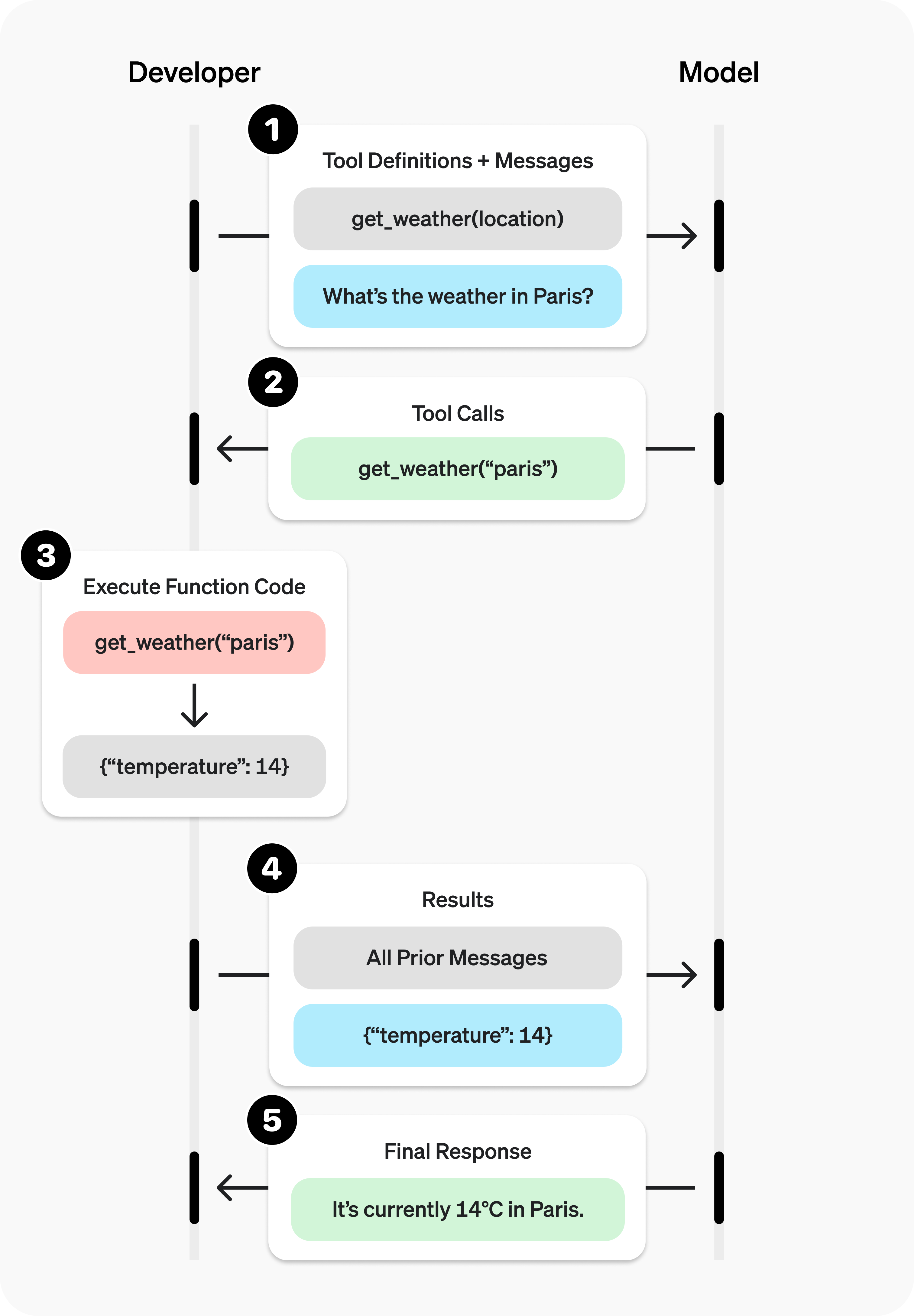
函数工具示例
让我们来看一个 get_horoscope 函数的端到端工具调用流程,该函数用于获取某个星座的每日运势。
1
2
3
4
5
6
7
8
9
10
11
12
13
14
15
16
17
18
19
20
21
22
23
24
25
26
27
28
29
30
31
32
33
34
35
36
37
38
39
40
41
42
43
44
45
46
47
48
49
50
51
52
53
54
55
56
57
58
59
60
61
62
63
64
65
66
67
from openai import OpenAI
import json

client = OpenAI()

# 1. Define a list of callable tools for the model
tools = [
    {
        "type": "function",
        "function": {
            "name": "get_horoscope",
            "description": "Get today's horoscope for an astrological sign.",
            "parameters": {
                "type": "object",
                "properties": {
                    "sign": {
                        "type": "string",
                        "description": "An astrological sign like Taurus or Aquarius",
                    },
                },
                "required": ["sign"],
                "additionalProperties": False,
            },
            "strict": True,
        },
    },
]

def get_horoscope(sign):
    return f"{sign}: Next Tuesday you will befriend a baby otter."

messages = [
    {"role": "user", "content": "What is my horoscope? I am an Aquarius."}
]

# 2. Prompt the model with tools defined
response = client.chat.completions.create(
    model="gpt-4.1",
    messages=messages,
    tools=tools,
)

messages.append(response.choices[0].message)

for tool_call in response.choices[0].message.tool_calls or []:
    if tool_call.function.name == "get_horoscope":
        # 3. Execute the function logic for get_horoscope
        args = json.loads(tool_call.function.arguments)
        horoscope = get_horoscope(args["sign"])

        # 4. Provide function call results to the model
        messages.append(
            {
                "role": "tool",
                "tool_call_id": tool_call.id,
                "content": json.dumps({"horoscope": horoscope}),
            }
        )

response = client.chat.completions.create(
    model="gpt-4.1",
    messages=messages,
    tools=tools,
)

# 5. The model should be able to give a response!
print(response.choices[0].message.content)
1
2
3
4
5
6
7
8
9
10
11
12
13
14
15
16
17
18
19
20
21
22
23
24
25
26
27
28
29
30
31
32
33
34
35
36
37
38
39
40
41
42
43
44
45
46
47
48
49
50
51
52
53
54
55
56
57
58
59
60
61
62
63
64
65
66
67
68
69
70
from openai import OpenAI
import json
client = OpenAI()
# 1. Define a list of callable tools for the model
tools = [
{
"type": "function",
"name": "get_horoscope",
"description": "Get today's horoscope for an astrological sign.",
"parameters": {
"type": "object",
"properties": {
"sign": {
"type": "string",
"description": "An astrological sign like Taurus or Aquarius",
},
},
"required": ["sign"],
},
},
]
def get_horoscope(sign):
return f"{sign}: Next Tuesday you will befriend a baby otter."
# Create a running input list we will add to over time
input_list = [
{"role": "user", "content": "What is my horoscope? I am an Aquarius."}
]
# 2. Prompt the model with tools defined
response = client.responses.create(
model="gpt-5",
tools=tools,
input=input_list,
)
# Save function call outputs for subsequent requests
input_list += response.output
for item in response.output:
if item.type == "function_call":
if item.name == "get_horoscope":
# 3. Execute the function logic for get_horoscope
sign = json.loads(item.arguments)["sign"]
horoscope = get_horoscope(sign)
# 4. Provide function call results to the model
input_list.append({
"type": "function_call_output",
"call_id": item.call_id,
"output": horoscope,
})
print("Final input:")
print(input_list)
response = client.responses.create(
model="gpt-5",
instructions="Respond only with a horoscope generated by a tool.",
tools=tools,
input=input_list,
)
# 5. The model should be able to give a response!
print("Final output:")
print(response.model_dump_json(indent=2))
print("\n" + response.output_text)请注意,对于 GPT-5 或 o4-mini 等推理模型,在带有工具调用的模型响应中返回的任何推理项,也必须与工具调用输出一起传回。
定义函数
函数通常在每次 API 请求的 tools 参数中声明。使用 工具搜索,你的应用程序也可以在交互的稍后阶段加载延迟函数。无论哪种方式,每个可调用的函数都使用相同的 schema 结构。函数定义具有以下属性:
| 字段 | 描述 |
|---|---|
type | 此项应始终为 function |
name | The function’s name (e.g. get_weather) |
description | 关于何时以及如何使用该函数的详细信息 |
parameters | JSON schema 定义函数的输入参数 |
strict | 是否强制启用函数调用的严格模式 |
这是 a 的示例函数定义 get_weather 函数
1
2
3
4
5
6
7
8
9
10
11
12
13
14
15
16
17
18
19
20
21
22
{
  "type": "function",
  "name": "get_weather",
  "description": "Retrieves current weather for the given location.",
  "parameters": {
    "type": "object",
    "properties": {
      "location": {
        "type": "string",
        "description": "City and country e.g. Bogotá, Colombia"
      },
      "units": {
        "type": "string",
        "enum": ["celsius", "fahrenheit"],
        "description": "Units the temperature will be returned in."
      }
    },
    "required": ["location", "units"],
    "additionalProperties": false
  },
  "strict": true
}
因为 parameters 由 a 定义 JSON schema,你可以利用其诸多丰富的功能,例如属性类型、枚举、描述、嵌套对象以及递归对象。
定义命名空间
使用命名空间按领域对相关工具进行分组,例如 crm, billing, or shipping。命名空间有助于组织相似的工具,并且当模型需要在不同系统或用途的工具之间进行选择时尤为有用,例如一个用于你的 CRM 的搜索工具,另一个用于你的支持工单系统。
1
2
3
4
5
6
7
8
9
10
11
12
13
14
15
16
17
18
19
20
21
22
23
24
25
26
27
28
29
30
31
32
33
34
{
  "type": "namespace",
  "name": "crm",
  "description": "CRM tools for customer lookup and order management.",
  "tools": [
    {
      "type": "function",
      "name": "get_customer_profile",
      "description": "Fetch a customer profile by customer ID.",
      "parameters": {
        "type": "object",
        "properties": {
          "customer_id": { "type": "string" }
        },
        "required": ["customer_id"],
        "additionalProperties": false
      }
    },
    {
      "type": "function",
      "name": "list_open_orders",
      "description": "List open orders for a customer ID.",
      "defer_loading": true,
      "parameters": {
        "type": "object",
        "properties": {
          "customer_id": { "type": "string" }
        },
        "required": ["customer_id"],
        "additionalProperties": false
      }
    }
  ]
}
工具搜索
如果你需要让模型访问庞大的工具生态系统,你可以延迟加载其中的部分或全部工具,使用 tool_search。该 tool_search 工具可让模型搜索相关工具,将其添加到模型上下文中,然后使用它们。仅 gpt-5.4 及更高版本的模型支持此功能。请阅读 工具搜索指南 to learn more.
定义函数的最佳实践
-
编写清晰详尽的函数名称、参数描述和说明。
- 明确描述函数和每个参数的目的 (及其格式),以及输出代表什么。
- 使用系统提示词来描述何时使用(以及何时不使用)每个函数。 通常,告诉模型 确切地 要做什么。
- 包含示例和边缘情况,尤其是为了纠正任何重复出现的失败。(Note: 添加示例可能会损害 推理模型.)
- 的性能。对于延迟加载的工具,请将详细指导放在函数描述中,并保持命名空间描述简洁。 命名空间有助于模型选择要加载的内容;函数描述有助于其正确使用已加载的工具。
-
应用软件工程最佳实践。
- 让函数显而易见且直观. (最小惊讶原则)
- 使用枚举 和对象结构来使无效状态无法表示。(例如,
toggle_light(on: bool, off: bool)允许无效调用) - 通过实习生测试。 仅根据你提供给模型的信息,实习生/人类能否正确使用该函数?(如果不能,他们会问你什么问题?将答案添加到提示中。)
-
尽可能使用代码来减轻模型的负担。
- 不要让模型填充你已知的参数。 例如,如果你已经有一个
order_id而不是基于之前的菜单来设置order_id参数——相反,不使用任何参数submit_refund()and pass theorder_idwith code. - 合并总是按顺序调用的函数。 例如,如果你总是调用
mark_location()在query_location(),只需将标记逻辑移至查询函数调用中。
- 不要让模型填充你已知的参数。 例如,如果你已经有一个
-
之后
- 尽量减少初始可用函数的数量,以提高准确率。 在不同的函数数量下
- 评估你的性能。 建议在单轮开始时,可用的函数数量应少于 20 个
- (同一时间),尽管这只是一个软性建议。 使用工具搜索
-
来推迟加载工具界面中庞大或不常用的部分,而不是一开始就暴露所有内容。
- 利用 OpenAI 资源。 in the 在 Playground 中生成并迭代函数模式.
- 考虑 微调 以提高函数调用的准确性 ,适用于函数数量较多或任务难度较高的情况。(示例代码)
Token 用量
在底层,函数会以模型已训练过的语法被注入到系统消息中。这意味着可调用的函数定义会计入模型的上下文限制,并作为输入 token 计费。如果遇到 token 限制,我们建议限制预先加载的函数数量,尽可能缩短描述,或者使用 工具搜索 以便仅在需要时才延迟加载工具。
还可以使用 微调 来减少 token 的使用量,前提是你在工具规范中定义了大量函数。
处理函数调用
当模型调用函数时,你必须执行该函数并返回结果。由于模型响应可能包含零次、一次或多次调用,因此最好假设存在多个调用。
响应中包含一个 tool_calls,每个 id 数组(稍后用于提交函数结果)和一个 function ,其中包含一个 name and JSON-encoded arguments.
1
2
3
4
5
6
7
8
9
10
11
12
13
14
15
16
17
18
19
20
21
22
23
24
25
26
[
    {
        "id": "call_12345xyz",
        "type": "function",
        "function": {
            "name": "get_weather",
            "arguments": "{\"location\":\"Paris, France\"}"
        }
    },
    {
        "id": "call_67890abc",
        "type": "function",
        "function": {
            "name": "get_weather",
            "arguments": "{\"location\":\"Bogotá, Colombia\"}"
        }
    },
    {
        "id": "call_99999def",
        "type": "function",
        "function": {
            "name": "send_email",
            "arguments": "{\"to\":\"bob@email.com\",\"body\":\"Hi bob\"}"
        }
    }
]1
2
3
4
5
6
7
8
9
10
for tool_call in completion.choices[0].message.tool_calls:
name = tool_call.function.name
args = json.loads(tool_call.function.arguments)
result = call_function(name, args)
messages.append({
"role": "tool",
"tool_call_id": tool_call.id,
"content": str(result)
})The response output 数组包含一个条目,其 type 的值为 function_call。每个条目带有一个 call_id (稍后用于提交函数结果), name,以及 JSON 编码的 arguments.
1
2
3
4
5
6
7
8
9
10
11
12
13
14
15
16
17
18
19
20
21
22
23
[
    {
        "id": "fc_12345xyz",
        "call_id": "call_12345xyz",
        "type": "function_call",
        "name": "get_weather",
        "arguments": "{\"location\":\"Paris, France\"}"
    },
    {
        "id": "fc_67890abc",
        "call_id": "call_67890abc",
        "type": "function_call",
        "name": "get_weather",
        "arguments": "{\"location\":\"Bogotá, Colombia\"}"
    },
    {
        "id": "fc_99999def",
        "call_id": "call_99999def",
        "type": "function_call",
        "name": "send_email",
        "arguments": "{\"to\":\"bob@email.com\",\"body\":\"Hi bob\"}"
    }
]
如果你正在使用 工具搜索,你也可能会看到 tool_search_call and tool_search_output 项之前的一个 function_call。函数加载后,按照此处所示的相同方式处理函数调用。
1
2
3
4
5
6
7
8
9
10
11
12
13
for tool_call in response.output:
    if tool_call.type != "function_call":
        continue

    name = tool_call.name
    args = json.loads(tool_call.arguments)

    result = call_function(name, args)
    input_messages.append({
        "type": "function_call_output",
        "call_id": tool_call.call_id,
        "output": str(result)
})在上面的示例中,我们假设有一个 call_function 来路由每个调用。以下是一个可能的实现:
1
2
3
4
5
def call_function(name, args):
    if name == "get_weather":
        return get_weather(**args)
    if name == "send_email":
return send_email(**args)格式化结果
你在 function_call_output 消息中传入的结果通常应该是一个字符串,其格式由你决定(JSON、错误码、纯文本等)。模型将根据需要解释该字符串。
对于返回图像或文件的函数,你可以传入一个包含图像或文件对象的 数组 来代替字符串。
如果你的函数没有返回值(例如 send_email),只需返回一个指示成功或失败的字符串。(例如 "success")
将结果合并到响应中
在将结果追加到你的 messages,您可以将它们发送回模型以获取最终响应。
1
2
3
4
5
completion = client.chat.completions.create(
    model="gpt-4.1",
    messages=messages,
    tools=tools,
)在将结果追加到你的 input,您可以将它们发送回模型以获取最终响应。
1
2
3
4
5
response = client.responses.create(
    model="gpt-4.1",
    input=input_messages,
    tools=tools,
)"It's about 15°C in Paris, 18°C in Bogotá, and I've sent that email to Bob."附加配置
工具选择
默认情况下,模型将决定何时使用以及使用多少工具。你可以使用以下配置强制执行特定行为: tool_choice parameter.
- Auto: (默认值) 调用零个、一个或多个函数。
tool_choice: "auto" - Required: 调用一个或多个函数。
tool_choice: "required" - 强制函数: 仅调用某个特定的函数。
tool_choice: {"type": "function", "name": "get_weather"} - 允许的工具: 将模型可调用的工具限制为模型可用工具的子集。
何时使用 allowed_tools
你可能想要配置一个 allowed_tools 列表,以防您只想让一部分工具在模型请求中可用,但又不想修改传入的工具列表,从而最大程度地节省 提示缓存.
1
2
3
4
5
6
7
8
9
"tool_choice": {
    "type": "allowed_tools",
    "mode": "auto",
    "tools": [
        { "type": "function", "name": "get_weather" },
        { "type": "function", "name": "search_docs" }
    ]
  }
}
您也可以设置 tool_choice to "none" 来模拟不传入任何函数的行为。
当您使用工具搜索时, tool_choice 仍然适用于当前轮次中可调用的工具。这在您加载了一部分工具并希望将模型限制在该子集内时最为有用。
并行函数调用
使用时无法进行并行函数调用 内置工具.
模型可能会选择在单轮中调用多个函数。您可以通过设置 parallel_tool_calls to false,这能确保恰好调用零个或一个工具。
Note: 目前,如果您使用的是微调模型,并且模型在一轮中调用了多个函数,那么 严格模式 在这些调用中将被禁用。
关于以下内容的注意事项 gpt-4.1-nano-2025-04-14: 的此快照 gpt-4.1-nano 如果启用了并行工具调用,有时可能会包含对同一工具的多次调用。建议在使用此 nano 快照时禁用此功能。
严格模式
设置 strict to true 将确保函数调用可靠地遵循函数 schema,而不是尽力而为。我们建议始终启用严格模式。
在底层,严格模式通过利用我们的 结构化输出 特性来实现,因此引入了以下几项要求:
additionalProperties必须设置为false对于parameters.- 中的每个对象。
properties中的所有字段都必须标记为required.
您可以通过添加 null as a type 选项来表示可选字段(参见下方示例)。
如果您发送 strict: true 并且您的 schema 不符合上述要求,请求将被拒绝,并附带有关缺失约束的详细信息。如果您省略 strict,默认值取决于具体 API:Responses 请求会将你的 schema 规范化为严格模式(例如,通过设置
additionalProperties: false 并将所有字段标记为必需),这可能会使以前可选的字段变为必需,而 Chat Completions 请求默认仍为非严格模式。若要在 Responses 中退出严格模式并保持非严格、尽力而为的函数调用,请显式设置 strict: false.
1
2
3
4
5
6
7
8
9
10
11
12
13
14
15
16
17
18
19
20
21
22
23
24
{
    "type": "function",
    "function": {
        "name": "get_weather",
        "description": "Retrieves current weather for the given location.",
        "strict": true,
        "parameters": {
            "type": "object",
            "properties": {
                "location": {
                    "type": "string",
                    "description": "City and country e.g. Bogotá, Colombia"
                },
                "units": {
                    "type": ["string", "null"],
                    "enum": ["celsius", "fahrenheit"],
                    "description": "Units the temperature will be returned in."
                }
            },
            "required": ["location", "units"],
            "additionalProperties": false
        }
    }
}1
2
3
4
5
6
7
8
9
10
11
12
13
14
15
16
17
18
19
20
21
22
{
"type": "function",
"function": {
"name": "get_weather",
"description": "Retrieves current weather for the given location.",
"parameters": {
"type": "object",
"properties": {
"location": {
"type": "string",
"description": "City and country e.g. Bogotá, Colombia"
},
"units": {
"type": "string",
"enum": ["celsius", "fahrenheit"],
"description": "Units the temperature will be returned in."
}
},
"required": ["location"],
}
}
}1
2
3
4
5
6
7
8
9
10
11
12
13
14
15
16
17
18
19
20
21
22
{
"type": "function",
"name": "get_weather",
"description": "Retrieves current weather for the given location.",
"strict": true,
"parameters": {
"type": "object",
"properties": {
"location": {
"type": "string",
"description": "City and country e.g. Bogotá, Colombia"
},
"units": {
"type": ["string", "null"],
"enum": ["celsius", "fahrenheit"],
"description": "Units the temperature will be returned in."
}
},
"required": ["location", "units"],
"additionalProperties": false
}
}1
2
3
4
5
6
7
8
9
10
11
12
13
14
15
16
17
18
19
20
{
"type": "function",
"name": "get_weather",
"description": "Retrieves current weather for the given location.",
"parameters": {
"type": "object",
"properties": {
"location": {
"type": "string",
"description": "City and country e.g. Bogotá, Colombia"
},
"units": {
"type": "string",
"enum": ["celsius", "fahrenheit"],
"description": "Units the temperature will be returned in."
}
},
"required": ["location"],
}
}在 演练场 中生成的所有 schema 均已启用严格模式。
虽然我们建议您启用严格模式,但它有以下几点限制:
- 部分 JSON schema 功能不受支持。(参见 受支持的 schema.)
特别是对于微调模型:
- 在首次请求时,schema 会经历额外的处理(然后会被缓存)。如果您的 schema 随每次请求而变化,这可能会导致更高的延迟。
- Schema 会被缓存以提升性能,因此不符合 零数据保留.
流式传输
流式传输可用于显示进度,具体方式为展示正在调用的函数以及模型填充其参数的过程,甚至可以实时显示这些参数。
流式传输函数调用与流式传输常规响应非常相似:您需要设置 stream to true and get chunks with delta objects.
1
2
3
4
5
6
7
8
9
10
11
12
13
14
15
16
17
18
19
20
21
22
23
24
25
26
27
28
29
30
31
32
33
34
from openai import OpenAI

client = OpenAI()

tools = [{
    "type": "function",
    "function": {
        "name": "get_weather",
        "description": "Get current temperature for a given location.",
        "parameters": {
            "type": "object",
            "properties": {
                "location": {
                    "type": "string",
                    "description": "City and country e.g. Bogotá, Colombia"
                }
            },
            "required": ["location"],
            "additionalProperties": False
        },
        "strict": True
    }
}]

stream = client.chat.completions.create(
    model="gpt-4.1",
    messages=[{"role": "user", "content": "What's the weather like in Paris today?"}],
    tools=tools,
    stream=True
)

for chunk in stream:
    delta = chunk.choices[0].delta
    print(delta.tool_calls)
1
2
3
4
5
6
7
8
9
[{"index": 0, "id": "call_DdmO9pD3xa9XTPNJ32zg2hcA", "function": {"arguments": "", "name": "get_weather"}, "type": "function"}]
[{"index": 0, "id": null, "function": {"arguments": "{\"", "name": null}, "type": null}]
[{"index": 0, "id": null, "function": {"arguments": "location", "name": null}, "type": null}]
[{"index": 0, "id": null, "function": {"arguments": "\":\"", "name": null}, "type": null}]
[{"index": 0, "id": null, "function": {"arguments": "Paris", "name": null}, "type": null}]
[{"index": 0, "id": null, "function": {"arguments": ",", "name": null}, "type": null}]
[{"index": 0, "id": null, "function": {"arguments": " France", "name": null}, "type": null}]
[{"index": 0, "id": null, "function": {"arguments": "\"}", "name": null}, "type": null}]
null而不是将数据块聚合为一个单独的 content 字符串,但是,您正在将分块聚合为编码的 arguments JSON 对象。
当模型调用一个或多个函数时, tool_calls 的每个字段 delta 将被填充。每个 tool_call 包含以下字段:
| 字段 | 描述 |
|---|---|
index | 标识是哪个函数调用的 delta 用于 |
id | 工具调用 ID。 |
function | 函数调用增量(name and arguments) |
type | 的类型 tool_call (始终为 function for function calls) |
这些字段中有很多仅在第一个 delta 工具调用时设置,例如 id, function.name,且 type.
下面是一个代码片段,演示如何汇总 delta到最终的 tool_calls object.
1
2
3
4
5
6
7
8
9
10
final_tool_calls = {}

for chunk in stream:
    for tool_call in chunk.choices[0].delta.tool_calls or []:
        index = tool_call.index

        if index not in final_tool_calls:
            final_tool_calls[index] = tool_call

        final_tool_calls[index].function.arguments += tool_call.function.arguments
1
2
3
4
5
6
7
8
{
"index": 0,
"id": "call_RzfkBpJgzeR0S242qfvjadNe",
"function": {
"name": "get_weather",
"arguments": "{\"location\":\"Paris, France\"}"
}
}流式传输可用于显示进度,具体方式为展示正在调用的函数以及模型填充其参数的过程,甚至可以实时显示这些参数。
流式传输函数调用与流式传输常规响应非常相似:您需要设置 stream to true and get different event objects.
1
2
3
4
5
6
7
8
9
10
11
12
13
14
15
16
17
18
19
20
21
22
23
24
25
26
27
28
29
30
31
32
from openai import OpenAI

client = OpenAI()

tools = [{
    "type": "function",
    "name": "get_weather",
    "description": "Get current temperature for a given location.",
    "parameters": {
        "type": "object",
        "properties": {
            "location": {
                "type": "string",
                "description": "City and country e.g. Bogotá, Colombia"
            }
        },
        "required": [
            "location"
        ],
        "additionalProperties": False
    }
}]

stream = client.responses.create(
    model="gpt-4.1",
    input=[{"role": "user", "content": "What's the weather like in Paris today?"}],
    tools=tools,
    stream=True
)

for event in stream:
    print(event)
1
2
3
4
5
6
7
8
9
10
{"type":"response.output_item.added","response_id":"resp_1234xyz","output_index":0,"item":{"type":"function_call","id":"fc_1234xyz","call_id":"call_1234xyz","name":"get_weather","arguments":""}}
{"type":"response.function_call_arguments.delta","response_id":"resp_1234xyz","item_id":"fc_1234xyz","output_index":0,"delta":"{\""}
{"type":"response.function_call_arguments.delta","response_id":"resp_1234xyz","item_id":"fc_1234xyz","output_index":0,"delta":"location"}
{"type":"response.function_call_arguments.delta","response_id":"resp_1234xyz","item_id":"fc_1234xyz","output_index":0,"delta":"\":\""}
{"type":"response.function_call_arguments.delta","response_id":"resp_1234xyz","item_id":"fc_1234xyz","output_index":0,"delta":"Paris"}
{"type":"response.function_call_arguments.delta","response_id":"resp_1234xyz","item_id":"fc_1234xyz","output_index":0,"delta":","}
{"type":"response.function_call_arguments.delta","response_id":"resp_1234xyz","item_id":"fc_1234xyz","output_index":0,"delta":" France"}
{"type":"response.function_call_arguments.delta","response_id":"resp_1234xyz","item_id":"fc_1234xyz","output_index":0,"delta":"\"}"}
{"type":"response.function_call_arguments.done","response_id":"resp_1234xyz","item_id":"fc_1234xyz","output_index":0,"arguments":"{\"location\":\"Paris, France\"}"}
{"type":"response.output_item.done","response_id":"resp_1234xyz","output_index":0,"item":{"type":"function_call","id":"fc_1234xyz","call_id":"call_1234xyz","name":"get_weather","arguments":"{\"location\":\"Paris, France\"}"}}而不是将数据块聚合为一个单独的 content 字符串,但是,您正在将分块聚合为编码的 arguments JSON 对象。
当模型调用一个或多个函数时,将发出一个类型为 response.output_item.added 的事件(针对每个函数调用),其中包含以下字段:
| 字段 | 描述 |
|---|---|
response_id | 该函数调用所属响应的 ID |
output_index | 响应中输出项的索引。它代表响应中的各个函数调用。 |
item | 进行中的函数调用项,包含一个 name, arguments and id 字段 |
之后,你将收到一系列类型为 response.function_call_arguments.delta 的事件,其中将包含 delta of the arguments 字段。这些事件包含以下字段:
| 字段 | 描述 |
|---|---|
response_id | 该函数调用所属响应的 ID |
item_id | 该增量所属函数调用项的 ID |
output_index | 响应中输出项的索引。它代表响应中的各个函数调用。 |
delta | The delta of the arguments field. |
下面是一个代码片段,演示如何汇总 delta到最终的 tool_call object.
1
2
3
4
5
6
7
8
9
10
final_tool_calls = {}

for event in stream:
    if event.type === 'response.output_item.added':
        final_tool_calls[event.output_index] = event.item;
    elif event.type === 'response.function_call_arguments.delta':
        index = event.output_index

        if final_tool_calls[index]:
            final_tool_calls[index].arguments += event.delta
1
2
3
4
5
6
7
{
"type": "function_call",
"id": "fc_1234xyz",
"call_id": "call_2345abc",
"name": "get_weather",
"arguments": "{\"location\":\"Paris, France\"}"
}当模型完成函数调用时,将发出一个类型为 response.function_call_arguments.done 的事件。此事件包含完整的函数调用,包括以下字段:
| 字段 | 描述 |
|---|---|
response_id | 该函数调用所属响应的 ID |
output_index | 响应中输出项的索引。它代表响应中的各个函数调用。 |
item | 包含 a 的函数调用项 name, arguments and id field. |
自定义工具
自定义工具的工作方式与 JSON schema 驱动的函数工具大致相同。但与其向模型明确指定您的工具需要什么输入,不如让模型将任意字符串作为输入传回给您的工具。这有助于避免将响应不必要地包装在 JSON 中,或者对响应应用自定义语法(下文有更多相关内容)。
以下代码示例展示了如何创建一个自定义工具,该工具预期接收包含 Python 代码的文本字符串作为响应。
1
2
3
4
5
6
7
8
9
10
11
12
13
14
15
16
from openai import OpenAI

client = OpenAI()

response = client.responses.create(
    model="gpt-5",
    input="Use the code_exec tool to print hello world to the console.",
    tools=[
        {
            "type": "custom",
            "name": "code_exec",
            "description": "Executes arbitrary Python code.",
        }
    ]
)
print(response.output)和之前一样, output 数组将包含由模型生成的工具调用。只是这一次,工具调用的输入以纯文本形式给出。
1
2
3
4
5
6
7
8
9
10
11
12
13
14
15
16
[
  {
    "id": "rs_6890e972fa7c819ca8bc561526b989170694874912ae0ea6",
    "type": "reasoning",
    "content": [],
    "summary": []
  },
  {
    "id": "ctc_6890e975e86c819c9338825b3e1994810694874912ae0ea6",
    "type": "custom_tool_call",
    "status": "completed",
    "call_id": "call_aGiFQkRWSWAIsMQ19fKqxUgb",
    "input": "print(\"hello world\")",
    "name": "code_exec"
  }
]
上下文无关文法
A 上下文无关文法 (CFG) 是一组规则,用于定义如何以给定格式生成有效文本。对于自定义工具,您可以提供 CFG 来约束模型对自定义工具的文本输入。
您可以在配置自定义工具时使用 grammar 参数来提供自定义 CFG。目前,在定义文法时我们支持两种 CFG 语法: lark and regex.
Lark CFG
1
2
3
4
5
6
7
8
9
10
11
12
13
14
15
16
17
18
19
20
21
22
23
24
25
26
27
28
29
30
31
32
33
34
from openai import OpenAI

client = OpenAI()

grammar = """
start: expr
expr: term (SP ADD SP term)* -> add
| term
term: factor (SP MUL SP factor)* -> mul
| factor
factor: INT
SP: " "
ADD: "+"
MUL: "*"
%import common.INT
"""

response = client.responses.create(
    model="gpt-5",
    input="Use the math_exp tool to add four plus four.",
    tools=[
        {
            "type": "custom",
            "name": "math_exp",
            "description": "Creates valid mathematical expressions",
            "format": {
                "type": "grammar",
                "syntax": "lark",
                "definition": grammar,
            },
        }
    ]
)
print(response.output)工具的输出随后应符合您定义的 Lark CFG:
1
2
3
4
5
6
7
8
9
10
11
12
13
14
15
16
[
  {
    "id": "rs_6890ed2b6374819dbbff5353e6664ef103f4db9848be4829",
    "type": "reasoning",
    "content": [],
    "summary": []
  },
  {
    "id": "ctc_6890ed2f32e8819daa62bef772b8c15503f4db9848be4829",
    "type": "custom_tool_call",
    "status": "completed",
    "call_id": "call_pmlLjmvG33KJdyVdC4MVdk5N",
    "input": "4 + 4",
    "name": "math_exp"
  }
]
文法是使用 Lark。模型采样使用 LLGuidance进行约束。Lark 的某些特性不受支持:
- 词法分析器正则表达式中的环视
- 词法分析器正则表达式中的惰性修饰符 (
*?,+?,??) 在词法分析器正则表达式中 - 终结符的优先级
- 模板
- 导入(内置
%importcommon 除外) %declares
我们建议使用 Lark IDE 来试验自定义文法。
保持文法简单
尽量使您的文法尽可能简单。如果文法过于复杂,OpenAI API 可能会返回错误,因此您应确保所需的文法兼容后再在 API 中使用它。
Lark 文法可能很难做到完美。虽然简单的文法执行起来最可靠,但复杂的文法通常需要对文法定义本身、提示和工具描述进行迭代,以确保模型不会偏离分布。
正确与错误的模式
正确(单一的有界终结符):
start: SENTENCE
SENTENCE: /[A-Za-z, ]*(the hero|a dragon|an old man|the princess)[A-Za-z, ]*(fought|saved|found|lost)[A-Za-z, ]*(a treasure|the kingdom|a secret|his way)[A-Za-z, ]*\./
不要这样做(在规则/终结符之间拆分)。这试图让规则在终结符之间划分自由文本。词法分析器会贪婪地匹配自由文本片段,您将失去控制:
start: sentence
sentence: /[A-Za-z, ]+/ subject /[A-Za-z, ]+/ verb /[A-Za-z, ]+/ object /[A-Za-z, ]+/
小写规则不会影响终结符从输入中的截取方式——只有终结符定义会。当您需要“锚点之间的自由文本”时,将其设为一个巨大的正则表达式终结符,以便词法分析器完全按照您预期的结构只匹配一次。
终结符与规则
Lark 将终结符用于词法标记(按惯例, UPPERCASE),将规则用于解析器产生式(按惯例, lowercase)。保持在受支持子集内并避免意外的最实用方法是使您的文法简单明确,并在关注点明确分离的情况下使用终结符和规则。
终结符使用的正则表达式语法是 Rust regex crate 语法,而非 Python 的 re 模块.
关键思想和最佳实践
词法分析器在解析器之前运行
终结符在应用任何 CFG 规则逻辑之前由词法分析器匹配(贪婪 / 最长匹配获胜)。如果您试图通过将终结符拆分到多个规则中来“塑造”它,词法分析器将无法被这些规则引导——只能被终结符正则表达式引导。
在从自由格式范围中截取文本时,首选单一终结符
如果您需要识别嵌入在任意文本中的模式(例如,锚点之间有“任何内容”的自然语言),请将其表示为单个终结符。不要尝试将自由文本终结符与解析器规则交织使用;贪婪的词法分析器将不会遵守您预期的边界,并且模型极有可能偏离分布。
使用规则来组合离散标记
当您将明确界定的终结符(数字、关键字、标点符号)组合成更大的结构时,规则是理想的选择。它们不是用于约束两个终结符之间“内容”的合适工具。
保持终结符简单、有界且独立
倾向于使用显式字符类和有界量符({0,10},而非无界的 * 在所有地方)。如果您需要“直到句号的任何文本”,请倾向于使用 /[^.\n]{0,10}*\./ 而不是 /.+\./ to avoid runaway growth.
使用规则来组合标记,而不是控制正则表达式内部
良好的规则使用示例:
start: expr
NUMBER: /[0-9]+/
PLUS: "+"
MINUS: "-"
expr: term (("+"|"-") term)*
term: NUMBER
显式处理空格
不要依赖开放式的 %ignore 指令。使用无界忽略指令可能会导致文法过于复杂,并且/或者可能导致模型偏离分布。倾向于在线程中允许空格的任何地方使用显式终结符。
故障排除
- 如果 API 因文法过于复杂而拒绝它,请简化规则和终结符,并移除无界的
%ignores. - 如果自定义工具被意外标记调用,请确认终结符没有重叠;检查贪婪的词法分析器。
- 当模型发生“偏离分布”时(表现为模型产生过长或重复的输出,在语法上有效但在语义上是错误的):
- 优化语法。
- 迭代提示词(添加少样本示例)和工具描述(解释语法,并指示模型进行推理以符合该语法)。
- 尝试更高的推理力度(例如,从中等提升至高等)。
Regex CFG
1
2
3
4
5
6
7
8
9
10
11
12
13
14
15
16
17
18
19
20
21
22
23
from openai import OpenAI

client = OpenAI()

grammar = r"^(?P<month>January|February|March|April|May|June|July|August|September|October|November|December)\s+(?P<day>\d{1,2})(?:st|nd|rd|th)?\s+(?P<year>\d{4})\s+at\s+(?P<hour>0?[1-9]|1[0-2])(?P<ampm>AM|PM)$"

response = client.responses.create(
    model="gpt-5",
    input="Use the timestamp tool to save a timestamp for August 7th 2025 at 10AM.",
    tools=[
        {
            "type": "custom",
            "name": "timestamp",
            "description": "Saves a timestamp in date + time in 24-hr format.",
            "format": {
                "type": "grammar",
                "syntax": "regex",
                "definition": grammar,
            },
        }
    ]
)
print(response.output)工具的输出随后应符合您定义的 Regex CFG:
1
2
3
4
5
6
7
8
9
10
11
12
13
14
15
16
[
  {
    "id": "rs_6894f7a3dd4c81a1823a723a00bfa8710d7962f622d1c260",
    "type": "reasoning",
    "content": [],
    "summary": []
  },
  {
    "id": "ctc_6894f7ad7fb881a1bffa1f377393b1a40d7962f622d1c260",
    "type": "custom_tool_call",
    "status": "completed",
    "call_id": "call_8m4XCnYvEmFlzHgDHbaOCFlK",
    "input": "August 7th 2025 at 10AM",
    "name": "timestamp"
  }
]
与 Lark 语法一样,正则表达式使用 Rust regex crate 语法,而非 Python 的 re 模块.
Regex 的某些功能不受支持:
- 环视
- 词法分析器正则表达式中的惰性修饰符 (
*?,+?,??)
关键思想和最佳实践
模式必须写在同一行
如果需要匹配输入中的换行符,请使用转义序列 \n。请勿使用 verbose/extended 模式,该模式允许模式跨越多行。
以纯模式字符串形式提供正则表达式
不要将模式包含在 //.