
推理模型 则 GPT-5.5 在生成响应之前使用内部推理 token。这有助于模型进行规划、有效地使用工具、评估备选方案、从歧义中恢复以及解决更困难的多步骤任务。推理模型特别适用于复杂问题解决、编程、科学推理和多步骤智能体工作流。它们也是 Codex CLI,我们的轻量级编码代理。
起始项 gpt-5.5 (用于大多数推理任务)的最佳模型。如果你需要针对更具挑战性问题且能容忍更高延迟的最高智能 API 选项,请使用 gpt-5.5-pro。如需更低成本,请考虑 gpt-5.4 ;如需更低成本和延迟,请考虑 gpt-5.4-mini.
推理模型在 Responses API。虽然依然支持 Chat Completions API,但使用 Responses 可以获得更优的模型智能和性能。
下效果更好。
开始使用推理 Responses API 调用
1
2
3
4
5
6
7
8
9
10
11
12
13
14
15
16
17
18
19
20
21
from openai import OpenAI

client = OpenAI()

prompt = """
Write a bash script that takes a matrix represented as a string with
format '[1,2],[3,4],[5,6]' and prints the transpose in the same format.
"""

response = client.responses.create(
    model="gpt-5.5",
    reasoning={"effort": "low"},
    input=[
        {
            "role": "user",
            "content": prompt
        }
    ]
)

print(response.output_text)推理努力
The reasoning.effort 在 Responses API 中使用推理模型
参数用于指导模型在执行任务时进行多深入的思考。 none, minimal, low, medium, high,且 xhigh。较低的努力程度侧重于速度和更低的 token 用量,而在较高努力程度下,模型会进行更全面的思考以提供更高质量的回答。模型还能在不同的推理努力程度之间进行自适应推理:面对简单任务时使用更少的 token,而面对复杂任务时则思考得更加深入。
支持的值因模型而异,可能包括 gpt-5.5 默认值同样因模型而异,而非通用。 medium 默认使用 gpt-5.5推理力度。这是
| 力度 | 的起点,能最好地平衡质量、可靠性和性能。 |
|---|---|
none | 最适用于… gpt-5.5,我们建议尝试 low 延迟关键型任务,这些任务不会从任何推理或多链工具调用中受益。对于延迟敏感的用例,建议从 none 开始,如有需要再转为常见用例包括语音、快速信息检索和分类。 |
low | 以适度延迟增加为代价的高效推理。非常适合需要使用工具、规划、搜索或多步决策,同时兼顾速度与成本优化的用例。 常见用例包括数据分析、起草、面向执行的编程以及客户支持/聊天助手工作流。 |
medium | 当质量和可靠性至关重要,且任务涉及规划、复杂推理和判断时。大多数工作负载的默认配置,在延迟、性能和成本的帕累托曲线上达到良好的平衡点。 常见用例包括智能体编程、研究、处理电子表格和幻灯片,以及委派长周期任务。 |
high | 深度推理、复杂调试、深度规划以及质量与智能比延迟更重要的关键高价值任务。推荐用于复杂工作流和智能体任务。 常见用例包括智能体编程、长周期研究和知识工作。根据任务的复杂程度,请同时评估 medium and high. |
xhigh | 深度研究、异步工作流以及需要极长推演的智能体任务。仅在你的评估显示出明显优势且足以证明额外的延迟和成本是合理的时候才使用。 常见用例包括安全与代码审查、企业生产力、更深入的研究任务以及极具挑战性的编程工作流。 |
要在延迟敏感的应用中更快地获得首个可见 token,可以让模型在继续深入推理之前先生成一段简短的前导文本。
某些模型仅支持这些值的一个子集,因此请在选择设置前查阅相关 模型页面 文档。
推理的工作原理
推理模型引入了 推理 token 推理令牌(除了输入和输出令牌之外)。模型使用这些推理令牌来“思考”,分解提示词并考虑多种生成回复的方式。我们类似 gpt-5.5 和 gpt-5.4 这样的推理模型支持交错式思考,即模型能够在思考之前以及思考期间生成可见的输出令牌,并且能够在工具调用之间进行思考。
下面是用户与助手之间多步对话的一个示例。每一步的输入和输出令牌都会被保留,而推理令牌则会被丢弃。
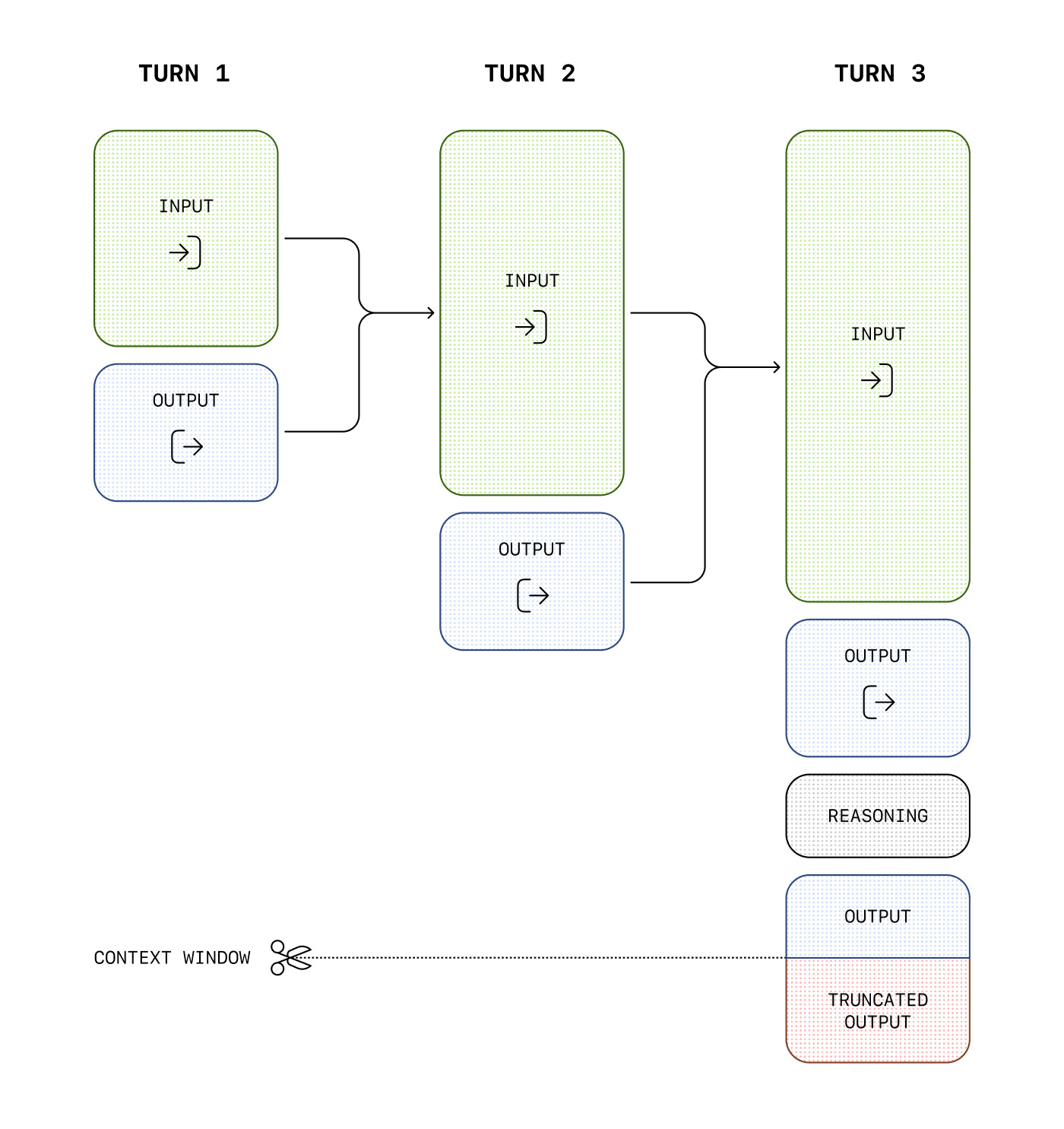
虽然推理令牌在 API 中不可见,但它们仍然占用模型的上下文窗口空间,并按 输出 tokens.
管理上下文窗口
在创建回复时,务必确保上下文窗口中有足够的空间供推理 token 使用。根据问题的复杂程度,模型可能会生成几百到数万个推理 token。所使用的推理 token 的确切数量可以在响应对象的 usage 对象中查看,在 output_tokens_details:
1
2
3
4
5
6
7
8
9
10
11
12
13
{
  "usage": {
    "input_tokens": 75,
    "input_tokens_details": {
      "cached_tokens": 0
    },
    "output_tokens": 1186,
    "output_tokens_details": {
      "reasoning_tokens": 1024
    },
    "total_tokens": 1261
  }
}
上下文窗口长度可以在 模型参考页面中找到,并且在不同的模型快照之间会有所不同。
控制成本
为了管理推理模型的成本,您可以使用
max_output_tokens
parameter.
分配推理空间
如果生成的 token 达到了上下文窗口限制或 max_output_tokens 您设定的值,您将收到一个包含 status of incomplete and incomplete_details with reason 进行上传,并将其设置为 max_output_tokens。这可能在生成任何可见的输出 token 之前发生,这意味着您可能会因为输入和推理 token 产生费用,但却没有收到可见的响应。
为防止这种情况,请确保上下文窗口中有足够的空间,或者将 max_output_tokens 值调整为更高的数字。OpenAI 建议在开始实验这些模型时,至少预留 25,000 个 token 用于推理和输出。随着您逐渐熟悉您的提示所需的推理 token 数量,可以相应地调整此缓冲区。
1
2
3
4
5
6
7
8
9
10
11
12
13
14
15
16
17
18
19
20
21
22
23
24
25
26
27
from openai import OpenAI

client = OpenAI()

prompt = """
Write a bash script that takes a matrix represented as a string with
format '[1,2],[3,4],[5,6]' and prints the transpose in the same format.
"""

response = client.responses.create(
    model="gpt-5.5",
    reasoning={"effort": "medium"},
    input=[
        {
            "role": "user",
            "content": prompt
        }
    ],
    max_output_tokens=300,
)

if response.status == "incomplete" and response.incomplete_details.reason == "max_output_tokens":
    print("Ran out of tokens")
    if response.output_text:
        print("Partial output:", response.output_text)
    else:
        print("Ran out of tokens during reasoning")
在上下文中保留推理项
在 函数调用 中使用推理模型时,在 Responses API,我们强烈建议您将上次函数调用返回的所有推理项连同函数的输出结果一起传回。如果模型连续多次调用函数,您应当将自上次以来的所有推理项、函数调用项以及函数调用输出项全部传回。 user 消息中。这使得模型能够继续其推理过程,以最具 token 效率的方式产生更好的结果。
最简单的方法是将先前响应中的所有推理项传入下一个响应。我们的系统会智能地忽略与您的函数无关的推理项,仅将相关的推理项保留在上下文中。您可以使用 previous_response_id 参数传入先前响应中的推理项,或者通过手动将过去响应中的所有 输出 项传入 输入 of a new one.
对于在传递给下一个响应之前可能需要截断和优化上下文窗口某些部分的高级用例,只需确保上一个用户消息和您的函数调用输出之间的所有项原封不动地传入下一个响应即可。这将确保模型拥有其所需的所有上下文。
查看 本指南 以了解更多关于手动上下文管理的信息。
加密推理项
在无状态模式下使用 Responses API 时(无论是使用 store 进行上传,并将其设置为 false,或当某组织启用了零数据保留时),你仍须使用上述技术在多个对话轮次间保留推理项。但为了拥有可随后续 API 请求一起发送的推理项,你的每个 API 请求都必须包含 reasoning.encrypted_content in the include API 请求的参数,如下所示:
1
2
3
4
5
6
7
8
9
10
curl https://api.openai.com/v1/responses \
  -H "Content-Type: application/json" \
  -H "Authorization: Bearer $OPENAI_API_KEY" \
  -d '{
    "model": "gpt-5.5",
    "reasoning": {"effort": "medium"},
    "input": "What is the weather like today?",
    "tools": [ ... function config here ... ],
    "include": [ "reasoning.encrypted_content" ]
  }'
现在, output 数组中的任何推理项都将具有一个 encrypted_content 属性,该属性将包含加密的推理 token,可以将其随未来的对话轮次一同传递。
推理摘要
虽然我们不会公开模型生成的原始推理 token,但你可以使用 summary 参数查看模型推理的摘要。请参阅我们的 模型文档 以了解哪些推理模型支持摘要功能。
不同的模型支持不同的推理摘要设置。例如,我们的计算机使用模型支持 concise 摘要器,而 o4-mini 支持 detailed。要访问某模型可用的最详细的摘要器,请将此参数的值设置为 auto. auto 对于当今的大多数推理模型,其效果将等同于 detailed ,但未来可能会提供更细粒度的设置。
推理摘要输出是 summary 数组中 reasoning 输出项的一部分。。除非你明确选择包含推理摘要,否则不会包含此输出。
以下示例展示了如何发出包含推理摘要的 API 请求。
1
2
3
4
5
6
7
8
9
10
11
12
13
from openai import OpenAI
client = OpenAI()

response = client.responses.create(
    model="gpt-5.5",
    input="What is the capital of France?",
    reasoning={
        "effort": "low",
        "summary": "auto"
    }
)

print(response.output)此 API 请求将返回一个输出数组,其中包含助手消息以及模型在生成该响应时的推理摘要。
1
2
3
4
5
6
7
8
9
10
11
12
13
14
15
16
17
18
19
20
21
22
23
24
25
26
[
  {
    "id": "rs_6876cf02e0bc8192b74af0fb64b715ff06fa2fcced15a5ac",
    "type": "reasoning",
    "summary": [
      {
        "type": "summary_text",
        "text": "**Answering a simple question**\n\nI\u2019m looking at a straightforward question: the capital of France is Paris. It\u2019s a well-known fact, and I want to keep it brief and to the point. Paris is known for its history, art, and culture, so it might be nice to add just a hint of that charm. But mostly, I\u2019ll aim to focus on delivering a clear and direct answer, ensuring the user gets what they\u2019re looking for without any extra fluff."
      }
    ]
  },
  {
    "id": "msg_6876cf054f58819284ecc1058131305506fa2fcced15a5ac",
    "type": "message",
    "status": "completed",
    "content": [
      {
        "type": "output_text",
        "annotations": [],
        "logprobs": [],
        "text": "The capital of France is Paris."
      }
    ],
    "role": "assistant"
  }
]phase 参数
对于在 Responses API 中使用 GPT-5.5 和 GPT-5.4 且运行时间较长或工具调用密集的流程,请使用 assistant 消息 phase 字段,以避免提前停止和其他异常行为。
phase 在 API 级别是可选的,但 OpenAI 建议使用它。将 phase: "commentary" 用于中间的 assistant 更新(例如工具调用前的前导内容),并将 phase: "final_answer" 用于最终完成的回答。请勿添加 phase to user messages.
Using previous_response_id 通常是最简单的方法,因为之前的 assistant 状态会被保留。如果你手动重放 assistant 历史记录,请保留每个原始的 phase 值。在这些工作流中,缺失或丢失 phase 可能会导致前导内容被当作最终回答。有关特定模型的提示词指导,请参阅 提示 GPT-5.5.
Assistant 阶段值往返
1
2
3
4
5
6
7
8
9
10
11
12
13
14
15
16
17
18
19
20
21
22
23
24
25
from openai import OpenAI

client = OpenAI()

response = client.responses.create(
    model="gpt-5.5",
    input=[
        {
            "role": "assistant",
            "phase": "commentary",
            "content": "I’ll inspect the logs and then summarize root cause and remediation.",
        },
        {
            "role": "assistant",
            "phase": "final_answer",
            "content": "Root cause: cache invalidation race.",
        },
        {
            "role": "user",
            "content": "Great—now give me a rollout-safe fix plan.",
        },
    ],
)

print(response.output_text)
提示词建议
在对推理模型进行提示时,有一些差异需要考虑。当你为具备推理能力的 GPT-5 模型设定明确的目标、严格的约束以及显式的输出约定,而无需规定每一个中间步骤时,它们通常能发挥最佳效果。
- 为模型提供任务、约束条件和所需的输出格式。
- 将
reasoning.effort视为一个调节旋钮,而不是恢复质量的主要手段。 - 对于代理型或研究密集型工作流,请明确定义何为“完成”,以及模型应如何验证其工作。
有关使用推理模型最佳实践的更多信息, 请参阅此指南.
提示词示例
OpenAI o-series models are able to implement complex algorithms and produce code. This prompt asks o1 to refactor a React component based on some specific criteria.
1
2
3
4
5
6
7
8
9
10
11
12
13
14
15
16
17
18
19
20
21
22
23
24
25
26
27
28
29
30
31
32
33
34
35
36
37
38
39
40
41
42
43
44
import OpenAI from "openai";

const openai = new OpenAI();

const prompt = `
Instructions:
- Given the React component below, change it so that nonfiction books have red
  text.
- Return only the code in your reply
- Do not include any additional formatting, such as markdown code blocks
- For formatting, use four space tabs, and do not allow any lines of code to
  exceed 80 columns

const books = [
  { title: 'Dune', category: 'fiction', id: 1 },
  { title: 'Frankenstein', category: 'fiction', id: 2 },
  { title: 'Moneyball', category: 'nonfiction', id: 3 },
];

export default function BookList() {
  const listItems = books.map(book =>
    <li>
      {book.title}
    </li>
  );

  return (
    <ul>{listItems}</ul>
  );
}
`.trim();

const completion = await openai.chat.completions.create({
  model: "gpt-5.5",
  messages: [
    {
      role: "user",
      content: prompt,
    },
  ],
  store: true,
});

console.log(completion.choices[0].message.content);1
2
3
4
5
6
7
8
9
10
11
12
13
14
15
16
17
18
19
20
21
22
23
24
25
26
27
28
29
30
31
32
33
34
35
36
37
38
39
40
41
42
43
import OpenAI from "openai";
const openai = new OpenAI();
const prompt = `
Instructions:
- Given the React component below, change it so that nonfiction books have red
text.
- Return only the code in your reply
- Do not include any additional formatting, such as markdown code blocks
- For formatting, use four space tabs, and do not allow any lines of code to
exceed 80 columns
const books = [
{ title: 'Dune', category: 'fiction', id: 1 },
{ title: 'Frankenstein', category: 'fiction', id: 2 },
{ title: 'Moneyball', category: 'nonfiction', id: 3 },
];
export default function BookList() {
const listItems = books.map(book =>
<li>
{book.title}
</li>
);
return (
<ul>{listItems}</ul>
);
}
`.trim();
const response = await openai.responses.create({
model: "gpt-5.5",
input: [
{
role: "user",
content: prompt,
},
],
});
console.log(response.output_text);OpenAI o-series models are also adept in creating multi-step plans. This example prompt asks o1 to create a filesystem structure for a full solution, along with Python code that implements the desired use case.
1
2
3
4
5
6
7
8
9
10
11
12
13
14
15
16
17
18
19
20
21
22
23
24
25
26
import OpenAI from "openai";

const openai = new OpenAI();

const prompt = `
I want to build a Python app that takes user questions and looks
them up in a database where they are mapped to answers. If there
is close match, it retrieves the matched answer. If there isn't,
it asks the user to provide an answer and stores the
question/answer pair in the database. Make a plan for the directory
structure you'll need, then return each file in full. Only supply
your reasoning at the beginning and end, not throughout the code.
`.trim();

const completion = await openai.chat.completions.create({
  model: "gpt-5.5",
  messages: [
    {
      role: "user",
      content: prompt,
    },
  ],
  store: true,
});

console.log(completion.choices[0].message.content);1
2
3
4
5
6
7
8
9
10
11
12
13
14
15
16
17
18
19
20
21
22
23
24
25
import OpenAI from "openai";
const openai = new OpenAI();
const prompt = `
I want to build a Python app that takes user questions and looks
them up in a database where they are mapped to answers. If there
is close match, it retrieves the matched answer. If there isn't,
it asks the user to provide an answer and stores the
question/answer pair in the database. Make a plan for the directory
structure you'll need, then return each file in full. Only supply
your reasoning at the beginning and end, not throughout the code.
`.trim();
const response = await openai.responses.create({
model: "gpt-5.5",
input: [
{
role: "user",
content: prompt,
},
],
});
console.log(response.output_text);OpenAI o-series models have shown excellent performance in STEM research. Prompts asking for support of basic research tasks should show strong results.
1
2
3
4
5
6
7
8
9
10
11
12
13
14
15
16
17
18
19
20
21
22
import OpenAI from "openai";

const openai = new OpenAI();

const prompt = `
What are three compounds we should consider investigating to
advance research into new antibiotics? Why should we consider
them?
`;

const completion = await openai.chat.completions.create({
  model: "gpt-5.5",
  messages: [
    {
      role: "user",
      content: prompt,
    }
  ],
  store: true,
});

console.log(completion.choices[0].message.content);1
2
3
4
5
6
7
8
9
10
11
12
13
14
15
16
17
18
19
20
21
import OpenAI from "openai";
const openai = new OpenAI();
const prompt = `
What are three compounds we should consider investigating to
advance research into new antibiotics? Why should we consider
them?
`;
const response = await openai.responses.create({
model: "gpt-5.5",
input: [
{
role: "user",
content: prompt,
},
],
});
console.log(response.output_text);用例示例
一些在真实用例中使用推理模型的示例可在以下位置找到 the cookbook.
评估合成医疗数据集是否存在差异。
利用帮助中心文章来生成代理可执行的操作。