
The 检索 API 允许您执行 语义搜索 来遍历您的数据,这是一种能够显示语义相似结果的技术——即使它们匹配极少甚至完全不匹配关键词。检索功能本身非常有用,但如果与我们的模型结合使用来综合生成回答,其功能将尤为强大。
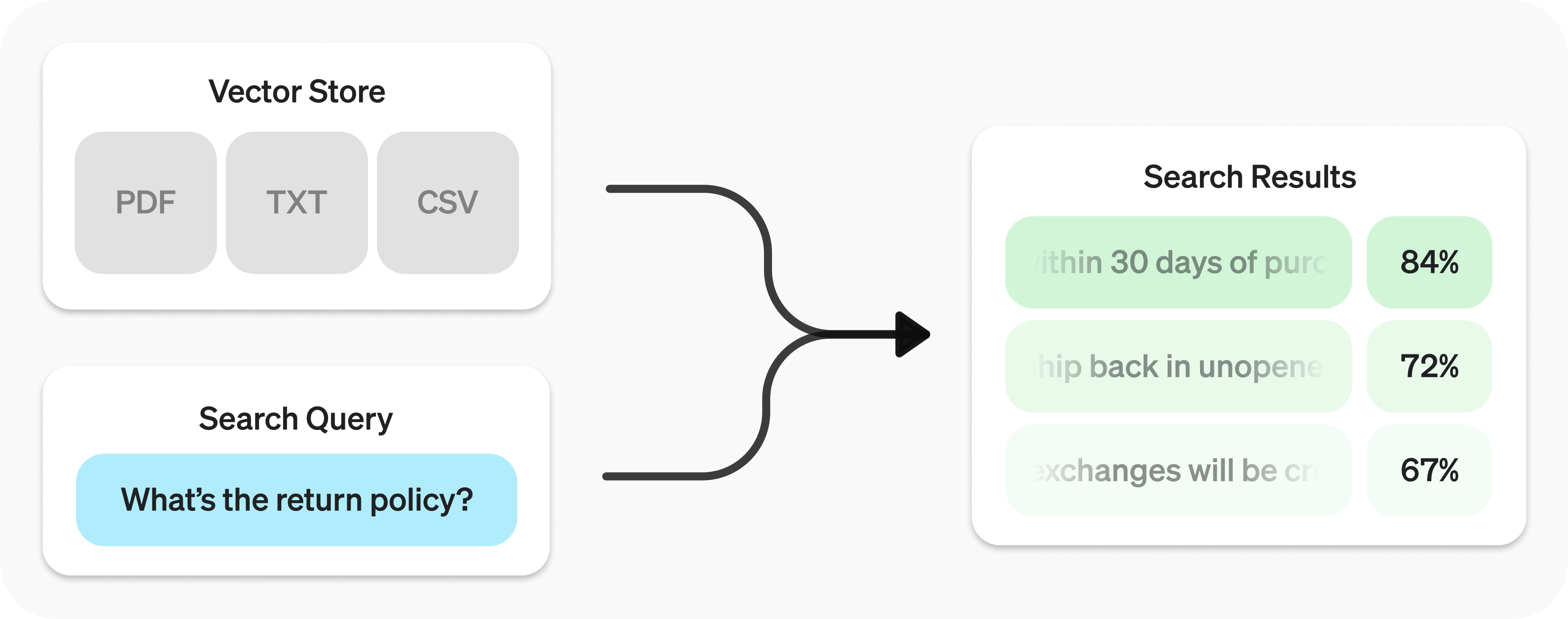
检索 API 的底层技术是 向量存储,它们作为数据的索引。本指南将介绍如何执行语义搜索,并深入探讨向量存储的细节。
快速入门
创建向量存储 and upload files.
1
2
3
4
5
6
7
8
9
10
11
from openai import OpenAI
client = OpenAI()

vector_store = client.vector_stores.create(        # Create vector store
    name="Support FAQ",
)

client.vector_stores.files.upload_and_poll(        # Upload file
    vector_store_id=vector_store.id,
    file=open("customer_policies.txt", "rb")
)发送搜索查询 to get relevant results.
1
2
3
4
5
6
user_query = "What is the return policy?"

results = client.vector_stores.search(
    vector_store_id=vector_store.id,
    query=user_query,
)要了解如何将搜索结果与我们的模型结合使用,请查看 综合回答 section.
语义搜索
语义搜索 是一种利用 向量嵌入 来呈现语义相关结果的技术。重要的是,这包括极少或没有共同关键词的结果,而传统搜索技术可能会遗漏这些结果。
例如,让我们看看以下搜索的潜在结果 "When did we go to the moon?":
| 文本 | 关键词相似度 | 语义相似度 |
|---|---|---|
| 首次登月发生在 1969 年 7 月。 | 0% | 65% |
| 第一位登上月球的人是尼尔·阿姆斯特朗。 | 27% | 43% |
| 当我吃月饼时,味道很好。 | 40% | 28% |
(Jaccard 用于关键词, 余弦 with text-embedding-3-small 用于语义。)
请注意,最相关的结果如何不包含搜索查询中的任何单词。这种灵活性使得语义搜索成为查询任何规模知识库的强大技术。
语义搜索的底层技术是 向量存储,我们将在本指南稍后进行详细介绍。本节将重点介绍语义搜索的机制。
执行语义搜索
您可以使用 search 函数查询向量存储,并用自然语言指定 query 。这将返回一个结果列表,每个结果包含相关的文本块、相似度得分和原始文件。
1
2
3
4
results = client.vector_stores.search(
    vector_store_id=vector_store.id,
    query="How many woodchucks are allowed per passenger?",
)
1
2
3
4
5
6
7
8
9
10
11
12
13
14
15
16
17
18
19
20
21
22
23
24
25
26
27
28
29
30
31
32
33
34
35
36
37
38
39
40
41
42
{
"object": "vector_store.search_results.page",
"search_query": "How many woodchucks are allowed per passenger?",
"data": [
{
"file_id": "file-12345",
"filename": "woodchuck_policy.txt",
"score": 0.85,
"attributes": {
"region": "North America",
"author": "Wildlife Department"
},
"content": [
{
"type": "text",
"text": "According to the latest regulations, each passenger is allowed to carry up to two woodchucks."
},
{
"type": "text",
"text": "Ensure that the woodchucks are properly contained during transport."
}
]
},
{
"file_id": "file-67890",
"filename": "transport_guidelines.txt",
"score": 0.75,
"attributes": {
"region": "North America",
"author": "Transport Authority"
},
"content": [
{
"type": "text",
"text": "Passengers must adhere to the guidelines set forth by the Transport Authority regarding the transport of woodchucks."
}
]
}
],
"has_more": false,
"next_page": null
}默认情况下,响应最多包含 10 个结果,但您可以使用 max_num_results param.
查询重写
某些查询风格会产生更好的结果,因此我们提供了一项设置,可以自动重写您的查询以实现最佳性能。在执行 rewrite_query=true 时通过设置来启用此功能。 search.
重写后的查询将显示在结果的 search_query field.
| 原始查询 | 重写后 |
|---|---|
| 我想知道主办公楼的高度。 | 主办公楼高度 |
| 运输危险材料的安全规定是什么? | 危险材料安全规定 |
| 如何就服务问题提出投诉? | 服务投诉提交流程 |
属性过滤
属性过滤通过应用条件(例如将搜索限制在特定日期范围内)来帮助缩小结果范围。您可以在 attribute_filter 中定义和组合条件,以便在执行语义搜索之前根据文件的属性对其进行精确筛选。
使用 比较过滤器 to compare a specific key in a file’s attributes with a given value,且 复合过滤器 来组合多个过滤器,使用 and and or.
1
2
3
4
5
{
  "type": "eq" | "ne" | "gt" | "gte" | "lt" | "lte" | "in" | "nin",  // comparison operators
  "key": "attributes_key",                           // attributes key
  "value": "target_value"                             // value to compare against
}1
2
3
4
{
"type": "and" | "or", // logical operators
"filters": [...]
}以下是一些示例过滤器。
1
2
3
4
5
{
  "type": "eq",
  "key": "region",
  "value": "us"
}1
2
3
4
5
6
7
8
9
10
11
12
13
14
15
{
"type": "and",
"filters": [
{
"type": "gte",
"key": "date",
"value": 1704067200 // unix timestamp for 2024-01-01
},
{
"type": "lte",
"key": "date",
"value": 1710892800 // unix timestamp for 2024-03-20
}
]
}1
2
3
4
5
{
"type": "in",
"property": "filename",
"value": ["example.txt", "example2.txt"]
}1
2
3
4
5
{
"type": "nin",
"property": "filename",
"value": ["draft.txt", "internal_notes.md"]
}1
2
3
4
5
6
7
8
9
10
11
12
13
14
15
16
17
18
19
20
21
22
23
24
25
26
27
28
29
30
31
32
33
34
35
{
"type": "or",
"filters": [
{
"type": "and",
"filters": [
{
"type": "or",
"filters": [
{
"type": "eq",
"key": "project_code",
"value": "X123"
},
{
"type": "eq",
"key": "project_code",
"value": "X999"
}
]
},
{
"type": "eq",
"key": "confidentiality",
"value": "top_secret"
}
]
},
{
"type": "eq",
"key": "language",
"value": "en"
}
]
}排序
如果您发现文件搜索结果不够相关,您可以调整 ranking_options 以提高响应质量。这包括指定一个 ranker,例如 auto or default-2024-08-21,并设置一个 score_threshold 介于 0.0 到 1.0 之间。较高的 score_threshold 会将结果限制为更相关的块,但这可能会排除一些潜在有用的块。当提供 ranking_options.hybrid_search 时,您还可以调节 hybrid_search.embedding_weight (rrf_embedding_weight) 和 hybrid_search.text_weight (rrf_text_weight) 来控制倒数排名融合如何平衡语义嵌入匹配与稀疏关键词匹配。增加前者以强调语义相似性,增加后者以强调文本重叠,并确保至少其中一个权重大于零。
向量存储
向量存储是为 Retrieval API 和 文件搜索 工具提供语义搜索支持的容器。当您将文件添加到向量存储时,它将被自动分块、嵌入并建立索引。
向量存储包含 vector_store_file 对象,这些对象由 file object.
对象类型 | 描述 |
|---|---|
file | 表示通过 Files API上传的内容。通常与向量存储一起使用,但也用于微调及其他用例。 |
vector_store | 可搜索文件的容器。 |
vector_store.file | 专门表示已分块并嵌入,且已关联到 file 的包装器类型 vector_store. 包含 attributes 用于过滤的映射。 |
定价
您将根据所有向量存储使用的总存储量收费,该总存储量由解析后的分块及其对应嵌入的大小决定。
| 存储空间 | 成本 |
|---|---|
| 最多 1 GB(跨所有存储) | 免费 |
| 超过 1 GB | $0.10/GB/天 |
查看 过期策略 以了解降低成本的选项。
向量存储操作
1
2
3
4
client.vector_stores.create(
    name="Support FAQ",
    file_ids=["file_123"]
)
1
2
3
client.vector_stores.retrieve(
vector_store_id="vs_123"
)1
2
3
4
client.vector_stores.update(
vector_store_id="vs_123",
name="Support FAQ Updated"
)1
2
3
client.vector_stores.delete(
vector_store_id="vs_123"
)client.vector_stores.list()向量存储文件操作
某些操作,例如 create for vector_store.file, 是异步的,可能需要一些时间才能完成 — 请使用我们的辅助函数,例如 create_and_poll 来阻塞等待直到其完成。否则,您可以检查其状态。从向量存储中删除文件是最终一致性的,在短时间内搜索结果可能仍会包含已删除文件的内容。
来向其中添加文件。添加文件的操作受每个向量存储 ID 的速率限制。向 /vector_stores/{vector_store_id}/files and /vector_stores/{vector_store_id}/file_batches 共享每个向量存储每分钟 300 次请求的限制。
1
2
3
4
client.vector_stores.files.create_and_poll(
    vector_store_id="vs_123",
    file_id="file_123"
)
1
2
3
4
client.vector_stores.files.upload_and_poll(
vector_store_id="vs_123",
file=open("customer_policies.txt", "rb")
)1
2
3
4
client.vector_stores.files.retrieve(
vector_store_id="vs_123",
file_id="file_123"
)1
2
3
4
5
client.vector_stores.files.update(
vector_store_id="vs_123",
file_id="file_123",
attributes={"key": "value"}
)1
2
3
4
client.vector_stores.files.delete(
vector_store_id="vs_123",
file_id="file_123"
)1
2
3
client.vector_stores.files.list(
vector_store_id="vs_123"
)批量操作
1
2
3
4
5
6
7
8
9
10
11
12
13
14
15
16
17
client.vector_stores.file_batches.create_and_poll(
    vector_store_id="vs_123",
    files=[
        {
            "file_id": "file_123",
            "attributes": {"department": "finance"}
        },
        {
            "file_id": "file_456",
            "chunking_strategy": {
                "type": "static",
                "max_chunk_size_tokens": 1200,
                "chunk_overlap_tokens": 200
            }
        }
    ]
)
1
2
3
4
client.vector_stores.file_batches.retrieve(
vector_store_id="vs_123",
batch_id="vsfb_123"
)1
2
3
4
client.vector_stores.file_batches.cancel(
vector_store_id="vs_123",
batch_id="vsfb_123"
)1
2
3
client.vector_stores.file_batches.list(
vector_store_id="vs_123"
)创建批量时,您可以提供 file_ids with optional attributes and/or chunking_strategy,或者使用 files 数组来传递包含每个文件 file_id 的对象组成的数组 attributes and chunking_strategy 的对象。这两个选项互斥,以便您可以清晰地控制是所有文件共享相同的设置,还是需要按文件进行覆盖。
为了实现更高的吞吐量将数据导入到单个向量存储中,我们建议尽可能使用批量创建。一个批量请求中最多可包含 500 个文件,与发送多个单文件创建请求相比,这通常能减少争用并缩短端到端延迟。
属性
每个 vector_store.file 可以具有关联的 attributes,一个可在执行 语义搜索 with 属性过滤时引用的值字典。该字典最多可包含 16 个键,每个键的长度限制为 256 个字符。
1
2
3
4
5
6
7
8
9
client.vector_stores.files.create(
    vector_store_id="<vector_store_id>",
    file_id="file_123",
    attributes={
        "region": "US",
        "category": "Marketing",
        "date": 1672531200      # Jan 1, 2023
    }
)过期策略
你可以为 vector_store 对象设置过期策略, expires_after。一旦向量存储过期,所有关联的 vector_store.file 对象将被删除,并且你将不再为此付费。
1
2
3
4
5
6
7
client.vector_stores.update(
    vector_store_id="vs_123",
    expires_after={
        "anchor": "last_active_at",
        "days": 7
    }
)限制
文件大小上限为 512 MB。每个文件包含的 token 不应超过 5,000,000(附加文件时会自动计算)。
分块处理
默认情况下, max_chunk_size_tokens 设置为 800 and chunk_overlap_tokens 设置为 400,即每个文件被分割成 800 个 token 的块来进行索引,连续块之间有 400 个 token 的重叠。
你可以通过设置来调整此选项 chunking_strategy 向向量存储添加文件时。存在某些限制: chunking_strategy:
max_chunk_size_tokens必须在 100 到 4096 之间(含)。chunk_overlap_tokens必须为非负数且不得超过max_chunk_size_tokens / 2.
合成响应
执行查询后,你可能希望根据结果合成响应。你可以利用我们的模型来实现这一点,通过提供结果和原始查询,以获取有依据的响应。
1
2
3
4
5
6
7
8
9
10
from openai import OpenAI

client = OpenAI()

user_query = "What is the return policy?"

results = client.vector_stores.search(
    vector_store_id=vector_store.id,
    query=user_query,
)
1
2
3
4
5
6
7
8
9
10
11
12
13
14
15
16
17
18
19
formatted_results = format_results(results.data)
'\n'.join('\n'.join(c.text) for c in result.content for result in results.data)
completion = client.chat.completions.create(
model="gpt-4.1",
messages=[
{
"role": "developer",
"content": "Produce a concise answer to the query based on the provided sources."
},
{
"role": "user",
"content": f"Sources: {formatted_results}\n\nQuery: '{user_query}'"
}
],
)
print(completion.choices[0].message.content)"Our return policy allows returns within 30 days of purchase."这里使用了示例 format_results 函数,其实现方式如下:
1
2
3
4
5
6
7
8
def format_results(results):
    formatted_results = ''
    for result in results.data:
        formatted_result = f"<result file_id='{result.file_id}' file_name='{result.file_name}'>"
        for part in result.content:
            formatted_result += f"<content>{part.text}</content>"
        formatted_results += formatted_result + "</result>"
    return f"<sources>{formatted_results}</sources>"