
本教程将介绍一个简单的示例:抓取网站(在此示例中为 OpenAI 网站),使用 Embeddings API,然后创建一个基础搜索功能,允许用户针对嵌入的信息提出问题。这旨在作为一个起点,用于开发利用自定义知识库的更复杂应用程序。
入门
具备 Python 和 GitHub 的基础知识将有助于学习本教程。在开始之前,请确保 设置 OpenAI API 密钥 and walk through the 快速入门教程。这将有助于您深入理解如何充分发挥 API 的潜力。
Python 是这里使用的主要编程语言,并搭配了 OpenAI、Pandas、transformers、NumPy 等其他常用包。如果您在完成本教程的过程中遇到任何问题,请在 OpenAI 社区论坛.
要获取代码,请克隆 GitHub 上的完整教程代码。或者,您也可以跟着教程将每个部分复制到 Jupyter notebook 中并逐步运行代码,或者仅仅阅读本文。避免出现任何问题的一个好方法是建立一个新的虚拟环境,并通过运行以下命令来安装所需的包:
1
2
3
4
5
python -m venv env

source env/bin/activate

pip install -r requirements.txt
设置网页爬虫
本教程的重点是 OpenAI API,因此如果您愿意,可以跳过关于如何创建网页爬虫的背景介绍,直接 下载源代码。否则,请展开下方的部分以完成抓取机制的实现。

构建 Embeddings 索引
CSV 是一种用于存储嵌入的常见格式。你可以使用此格式,通过将原始文本文件(位于 text 目录中)转换为 Pandas 数据帧来在 Python 中进行操作。Pandas 是一个流行的开源库,可帮助你处理表格数据(以行和列存储的数据)。
空白的空行会使文本文件变得杂乱,增加处理难度。一个简单的函数即可删除这些行并整理文件。
1
2
3
4
5
6
def remove_newlines(serie):
    serie = serie.str.replace('\n', ' ')
    serie = serie.str.replace('\\n', ' ')
    serie = serie.str.replace('  ', ' ')
    serie = serie.str.replace('  ', ' ')
    return serie
将文本转换为 CSV 需要遍历先前创建的 text 目录中的文本文件。打开每个文件后,删除多余的空格,并将修改后的文本追加到一个列表中。然后,将删除了新行的文本添加到一个空的 Pandas 数据帧中,并将该数据帧写入 CSV 文件。
多余的空格和换行符会使文本变得杂乱,并使嵌入过程复杂化。此处使用的代码有助于删除其中的一部分,但你可能会发现第三方库或其他方法对于去除更多不必要的字符很有用。
1
2
3
4
5
6
7
8
9
10
11
12
13
14
15
16
17
18
19
20
21
22
import pandas as pd

# Create a list to store the text files
texts=[]

# Get all the text files in the text directory
for file in os.listdir("text/" + domain + "/"):

    # Open the file and read the text
    with open("text/" + domain + "/" + file, "r", encoding="UTF-8") as f:
        text = f.read()

        # Omit the first 11 lines and the last 4 lines, then replace -, _, and #update with spaces.
        texts.append((file[11:-4].replace('-',' ').replace('_', ' ').replace('#update',''), text))

# Create a dataframe from the list of texts
df = pd.DataFrame(texts, columns = ['fname', 'text'])

# Set the text column to be the raw text with the newlines removed
df['text'] = df.fname + ". " + remove_newlines(df.text)
df.to_csv('processed/scraped.csv')
df.head()
在将原始文本保存为 CSV 文件之后,分词是下一步操作。此过程通过分解句子和单词将输入文本拆分为分词。有关此内容的直观演示,可以通过 查看我们的分词器 in the docs.
一个有用的经验法则是,对于常见的英文文本,一个分词通常对应约 4 个字符。这大约相当于 ¾ 个单词(即 100 个分词 ≈ 75 个单词)。
API 对用于嵌入的最大输入分词数量有限制。为了保持在限制范围内,需要将 CSV 文件中的文本拆分为多行。首先将记录每行的现有长度,以确定哪些行需要拆分。
1
2
3
4
5
6
7
8
9
10
11
12
13
import tiktoken

# Load the cl100k_base tokenizer which is designed to work with the ada-002 model
tokenizer = tiktoken.get_encoding("cl100k_base")

df = pd.read_csv('processed/scraped.csv', index_col=0)
df.columns = ['title', 'text']

# Tokenize the text and save the number of tokens to a new column
df['n_tokens'] = df.text.apply(lambda x: len(tokenizer.encode(x)))

# Visualize the distribution of the number of tokens per row using a histogram
df.n_tokens.hist()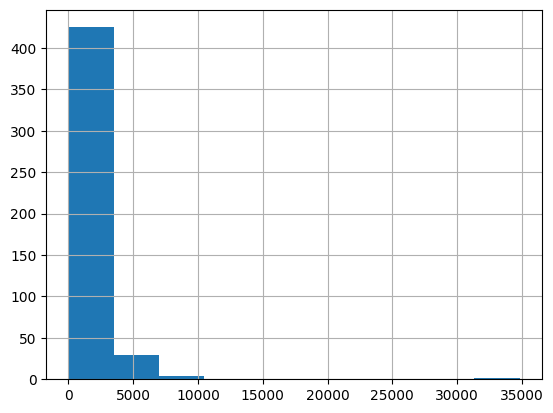
最新的嵌入模型最多可处理 8191 个输入分词,因此大多数行不需要任何分块,但对于抓取到的每个子页面来说可能并非如此,因此接下来的代码块会将较长的行拆分为较小的块。
max_tokens = 500

# Function to split the text into chunks of a maximum number of tokens
def split_into_many(text, max_tokens = max_tokens):

    # Split the text into sentences
    sentences = text.split('. ')

    # Get the number of tokens for each sentence
    n_tokens = [len(tokenizer.encode(" " + sentence)) for sentence in sentences]

    chunks = []
    tokens_so_far = 0
    chunk = []

    # Loop through the sentences and tokens joined together in a tuple
    for sentence, token in zip(sentences, n_tokens):

        # If the number of tokens so far plus the number of tokens in the current sentence is greater
        # than the max number of tokens, then add the chunk to the list of chunks and reset
        # the chunk and tokens so far
        if tokens_so_far + token > max_tokens:
            chunks.append(". ".join(chunk) + ".")
            chunk = []
            tokens_so_far = 0

        # If the number of tokens in the current sentence is greater than the max number of
        # tokens, go to the next sentence
        if token > max_tokens:
            continue

        # Otherwise, add the sentence to the chunk and add the number of tokens to the total
        chunk.append(sentence)
        tokens_so_far += token + 1

    return chunks


shortened = []

# Loop through the dataframe
for row in df.iterrows():

    # If the text is None, go to the next row
    if row[1]['text'] is None:
        continue

    # If the number of tokens is greater than the max number of tokens, split the text into chunks
    if row[1]['n_tokens'] > max_tokens:
        shortened += split_into_many(row[1]['text'])

    # Otherwise, add the text to the list of shortened texts
    else:
        shortened.append( row[1]['text'] )
再次可视化更新后的直方图有助于确认行是否已成功拆分为较短的片段。
1
2
3
df = pd.DataFrame(shortened, columns = ['text'])
df['n_tokens'] = df.text.apply(lambda x: len(tokenizer.encode(x)))
df.n_tokens.hist()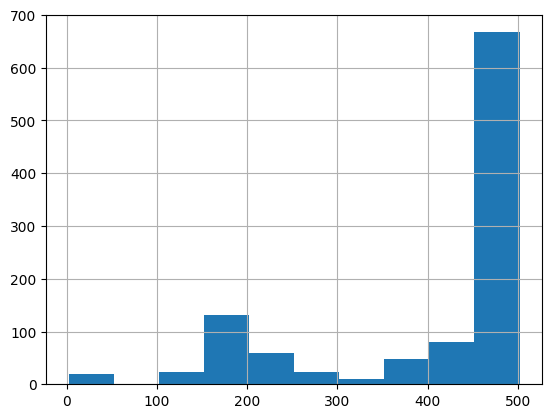
内容现在已被分解为更小的块,只需发送一个简单的请求到 OpenAI API,指定使用新的 text-embedding-ada-002 模型即可创建嵌入:
1
2
3
4
5
6
7
8
9
10
from openai import OpenAI

client = OpenAI(
    api_key=os.environ.get("OPENAI_API_KEY"),
)

df['embeddings'] = df.text.apply(lambda x: client.embeddings.create(input=x, engine='text-embedding-ada-002')['data'][0]['embedding'])

df.to_csv('processed/embeddings.csv')
df.head()
这大约需要 3-5 分钟,之后你的嵌入就可以使用了!
使用你的嵌入构建问答系统

嵌入已准备就绪,此过程的最后一步是创建一个简单的问答系统。该系统将接收用户的问题,为其创建嵌入,并将其与现有的嵌入进行比较,以从抓取的网站中检索最相关的文本。然后,gpt-3.5-turbo-instruct 模型将根据检索到的文本生成一个听起来自然的答案。
第一步是将嵌入转换为 NumPy 数组,鉴于有许多可用的操作 NumPy 数组的函数,这将在如何使用它方面提供更大的灵活性。它还会将维度展平为 1-D,这是许多后续操作所需的格式。
1
2
3
4
5
6
7
import numpy as np
from openai.embeddings_utils import distances_from_embeddings

df=pd.read_csv('processed/embeddings.csv', index_col=0)
df['embeddings'] = df['embeddings'].apply(eval).apply(np.array)

df.head()
现在数据已准备就绪,需要通过一个简单的函数将问题转换为嵌入。这很重要,因为使用嵌入的搜索会使用余弦距离来比较数字向量(即原始文本的转换结果)。如果向量在余弦距离上接近,则它们可能是相关的,并且可能就是问题的答案。OpenAI Python 包内置了一个 distances_from_embeddings 函数,在这里非常有用。
1
2
3
4
5
6
7
8
9
10
11
12
13
14
15
16
17
18
19
20
21
22
23
24
25
26
27
28
29
30
31
32
def create_context(
    question, df, max_len=1800, size="ada"
):
    """
    Create a context for a question by finding the most similar context from the dataframe
    """

    # Get the embeddings for the question
    q_embeddings = client.embeddings.create(input=question, engine='text-embedding-ada-002')['data'][0]['embedding']

    # Get the distances from the embeddings
    df['distances'] = distances_from_embeddings(q_embeddings, df['embeddings'].values, distance_metric='cosine')


    returns = []
    cur_len = 0

    # Sort by distance and add the text to the context until the context is too long
    for i, row in df.sort_values('distances', ascending=True).iterrows():

        # Add the length of the text to the current length
        cur_len += row['n_tokens'] + 4

        # If the context is too long, break
        if cur_len > max_len:
            break

        # Else add it to the text that is being returned
        returns.append(row["text"])

    # Return the context
    return "\n\n###\n\n".join(returns)
文本已被分解为更小的分词集合,因此按升序遍历并继续添加文本是确保获得完整答案的关键步骤。如果返回的内容超出了需要,也可以将 max_len 修改为更小的值。
上一步仅检索了与问题在语义上相关的文本块,因此它们可能包含答案,但不能保证一定包含。通过返回最可能的前 5 个结果,可以进一步提高找到答案的几率。
然后,回答提示将尝试从检索到的上下文中提取相关事实,以构建连贯的答案。如果没有相关的答案,提示将返回“我不知道”。
使用 completion endpoint 可以创建一个听起来很真实的答案 gpt-3.5-turbo-instruct.
1
2
3
4
5
6
7
8
9
10
11
12
13
14
15
16
17
18
19
20
21
22
23
24
25
26
27
28
29
30
31
32
33
34
35
36
37
38
39
40
41
42
43
def answer_question(
    df,
    model="gpt-3.5-turbo",
    question="Am I allowed to publish model outputs to Twitter, without a human review?",
    max_len=1800,
    size="ada",
    debug=False,
    max_tokens=150,
    stop_sequence=None
):
    """
    Answer a question based on the most similar context from the dataframe texts
    """
    context = create_context(
        question,
        df,
        max_len=max_len,
        size=size,
    )
    # If debug, print the raw model response
    if debug:
        print("Context:\n" + context)
        print("\n\n")

    try:
        # Create a chat completion using the question and context
        response = client.chat.completions.create(
            model="gpt-3.5-turbo",
            messages=[
                {"role": "system", "content": "Answer the question based on the context below, and if the question can't be answered based on the context, say \"I don't know\"\n\n"},
                {"role": "user", f"content": "Context: {context}\n\n---\n\nQuestion: {question}\nAnswer:"}
            ],
            temperature=0,
            max_tokens=max_tokens,
            top_p=1,
            frequency_penalty=0,
            presence_penalty=0,
            stop=stop_sequence,
        )
        return response.choices[0].message.strip()
    except Exception as e:
        print(e)
        return ""
完成了!一个嵌入了从 OpenAI 网站获取的知识的可用问答系统现已就绪。可以进行一些快速测试以查看输出的质量:
1
2
3
4
5
answer_question(df, question="What day is it?", debug=False)

answer_question(df, question="What is our newest embeddings model?")

answer_question(df, question="What is ChatGPT?")
响应将类似于以下内容:
"I don't know."

'The newest embeddings model is text-embedding-ada-002.'

'ChatGPT is a model trained to interact in a conversational way. It is able to answer followup questions, admit its mistakes, challenge incorrect premises, and reject inappropriate requests.'
如果系统未能按预期回答某个问题,建议搜索原始文本文件,以查看预期已知的信息是否真的最终被嵌入了。最初执行的抓取过程被设置为跳过所提供的原始域之外的站点,因此如果设置了子域,则系统可能并不掌握该知识。
目前,每次回答问题时都会传入数据帧。对于更面向生产的工作流,应该使用 向量数据库解决方案 而不是将嵌入存储在 CSV 文件中,但目前的方法是进行原型设计的绝佳选择。